
JAV Smart Boards are Google EDLA Certified, which means they come with full support for Google apps and services. With Google Play built right in, you can easily download and use the tools you need for teaching, collaboration, or business productivity—directly on your smart board.
Getting Started with Google Play
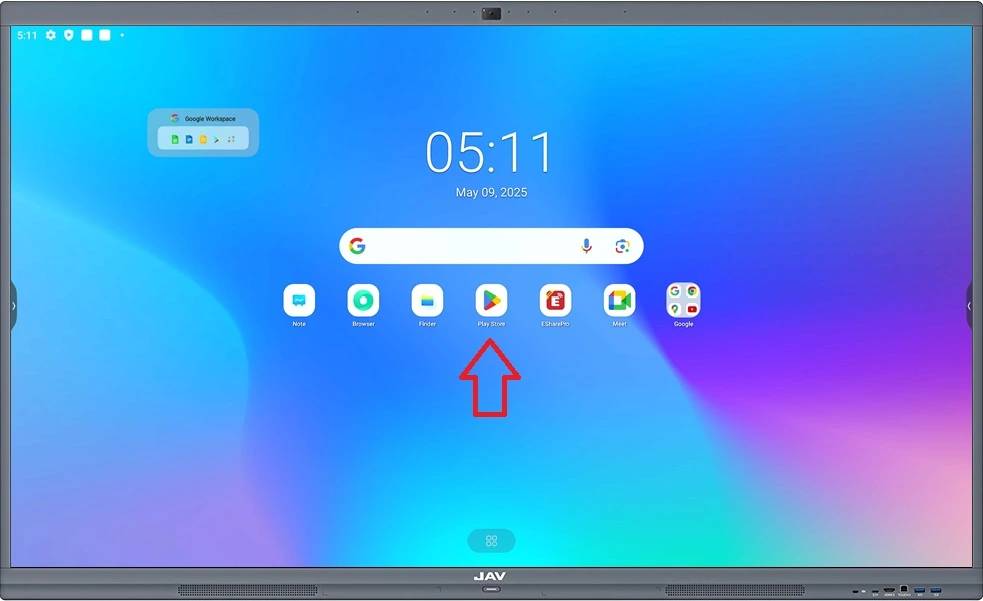
- Open Google Play
On the home screen, tap the Google Play Store icon to launch the store. - Sign In
Enter your Google Account credentials. If you don’t have one yet, you can create a free account directly on the device. - Browse and Search
Explore apps by category or use the search bar to quickly find specific tools. - Install Apps
Select the app you want, tap Install, and it will be added to your smart board.
Tips for Best Use
- Use your Google Account to sync apps, files, and preferences across devices.
- Install productivity apps (e.g., Google Meet, Drive, Docs) to enhance collaboration.
- Explore education and business tools to maximize the smart whiteboard experience.
With Google Play, your JAV Smart Board becomes more than just a display—it transforms into a powerful, all-in-one hub for work, learning, and creativity.