
You can personalize your device by changing the wallpaper and adjusting display settings.
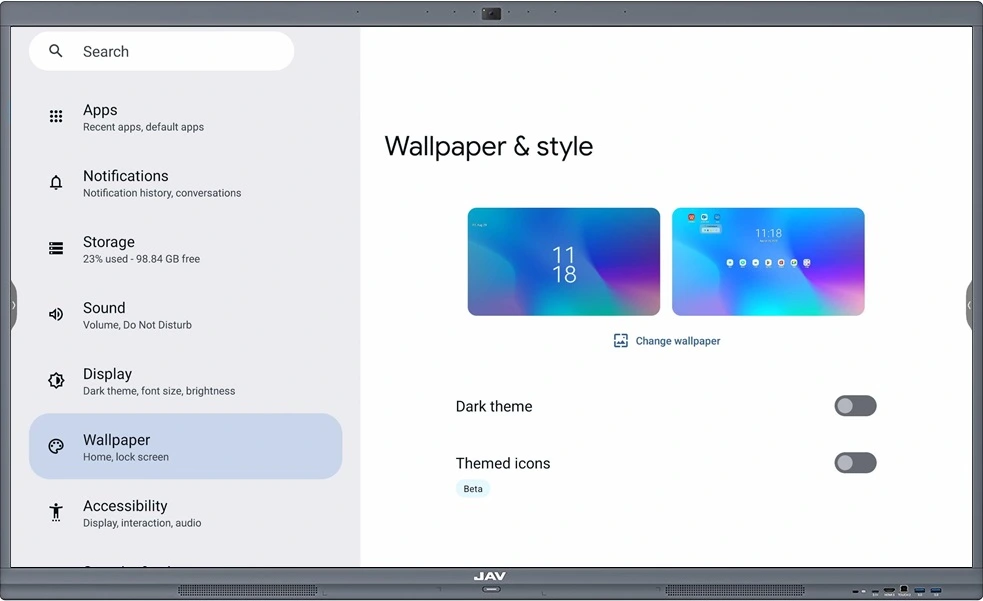
- Change Wallpaper
- Go to All Apps (via the button at the bottom of the Home screen or the sidebar) > Settings > Wallpapers.
- Tap Change Wallpaper to select a new background.
- You can use images stored on the device or choose from the default wallpapers provided in the system.
- Dark Theme
- Default setting: Off.
- You can enable or disable the Dark Theme by toggling the switch.
- Dark Theme helps reduce eye strain in low-light environments and may also help extend battery life.
- Themed Icons
- Default setting: Off (marked as Beta, meaning this feature may still be under testing).
- When enabled, app icons will adapt to the current theme (for example, Dark Theme), creating a more consistent and unified visual style.