
Some Android apps may require access to your location in order to work properly. If you have installed such apps on your JAV Board 10 Smart Board, you can enable location services by following the steps below.
Enable Location Service
- On the smart board, go to Settings > Location.
- Turn on the Use Location switch.
- Once enabled, apps with the right permissions will be able to use your location.
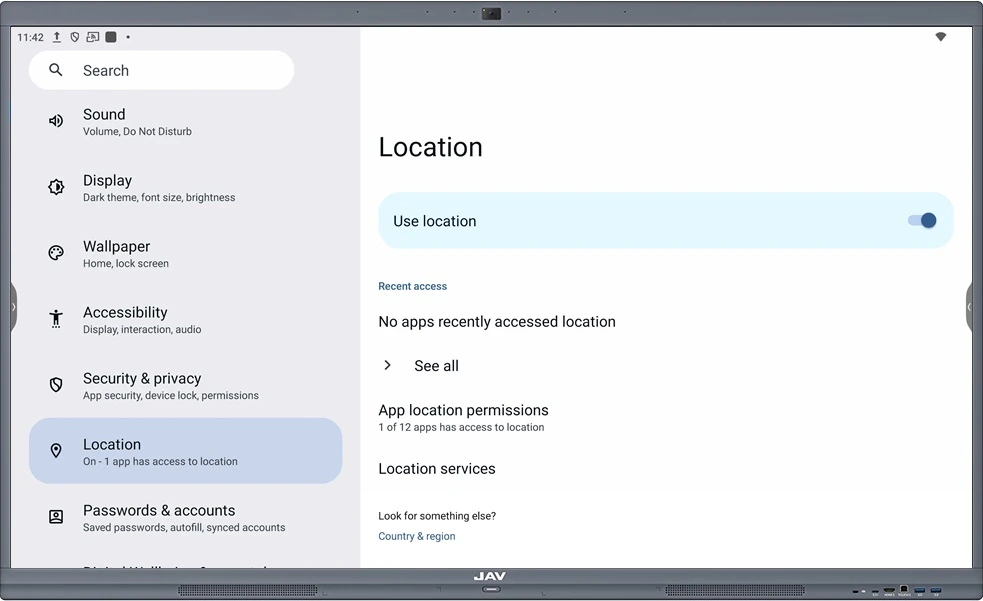
Location Settings Overview
- Recent Access
This section shows which apps have recently accessed your location.- If it says “No apps recently accessed location”, no apps have used the device’s location information recently.
- Tap See all to view the full location access history.
- App Location Permissions
Here you can see how many apps have permission to access your location.- Tap on this option to manage settings for each app.
- For each app, you can choose:
- Allow all the time
- Allow only while using the app
- Deny access
- Location Services
In this section, you’ll find additional options such as:- Earthquake alerts
- Emergency Location Service
- Google Location History
- Google Location Sharing
- Location Accuracy
- Trusted places
- Wi-Fi scanning
Adjust these settings based on your needs.
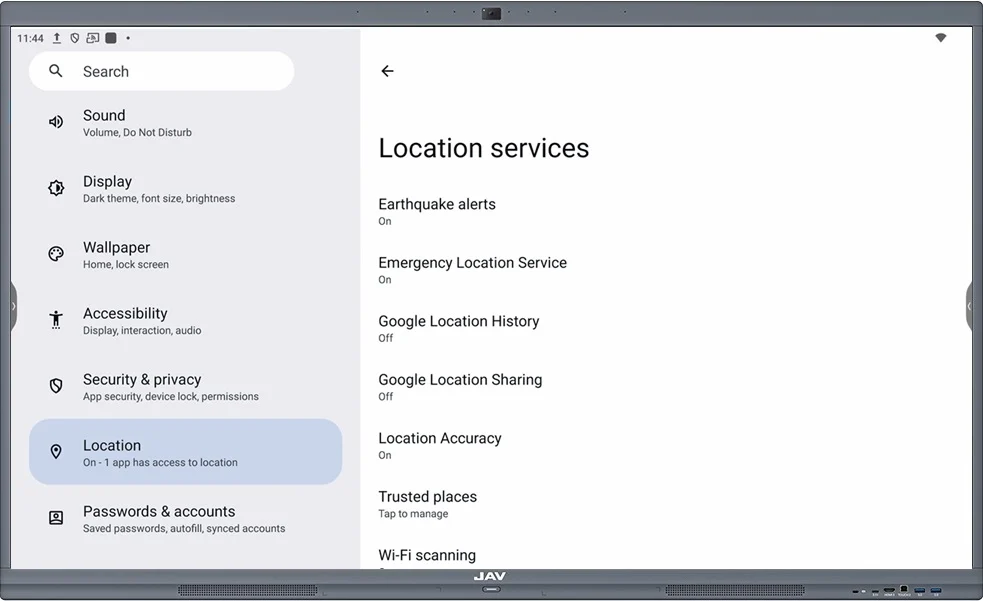
With these settings, you can control how and when apps on the JAV Board 10 Smart Whiteboard access your location, ensuring both functionality and privacy.