

This guide introduces the functions and proper usage of the JAV Board 10 Smart Board remote controller, including button descriptions, installation steps, and operating precautions.
Important Precautions
- Use the remote controller only for JAV H10S Pro Smart Board devices.
- Avoid dropping or exposing the remote to moisture, direct sunlight, or extreme temperatures.
- Do not use old and new batteries together, and remove batteries if the controller will not be used for an extended period.
- Please recycle used batteries properly to protect the environment.
Installing the Batteries
- Open the back cover of the remote controller.
- Insert two AAA batteries according to the polarity markings inside the compartment — ensure the positive (+) and negative (–) ends are aligned correctly.
- Close the battery cover and make sure the clip is securely fastened at the bottom.
Tip: Use high-quality alkaline batteries for longer performance.
Operating Range
The remote controller works effectively within:
- A distance of up to 8 meters (26 feet) from the Smart Board.
- A 30-degree angle to the left or right of the remote receiver.
For best performance, point the remote directly toward the receiver and ensure there are no obstacles between them.
Button Functions Overview
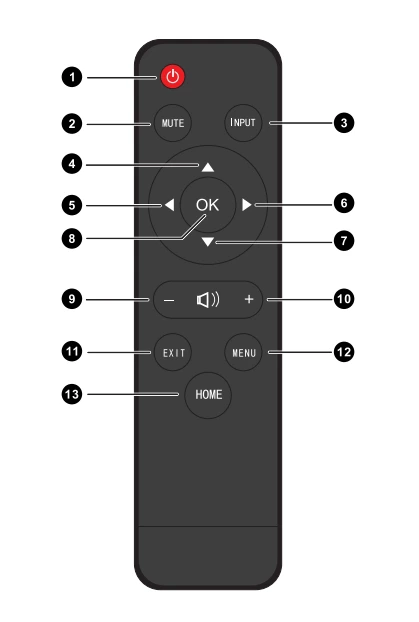
| No. | Button | Description |
|---|---|---|
| 1 | ⏻ Power | Turn the display on/off. |
| 2 | MUTE | Enter or exit mute mode. |
| 3 | INPUT | Pop up the Touch Menu – General Settings. |
| 4 | ▲ | Scroll up. |
| 5 | ◄ | Scroll left. |
| 6 | ► | Scroll right. |
| 7 | ▼ | Scroll down. |
| 8 | OK | Confirm selection or setting. |
| 9 | – | Decrease the volume. |
| 10 | + | Increase the volume. |
| 11 | EXIT | Exit the current page. |
| 12 | MENU | Open the main menu interface. |
| 13 | HOME | Return to the Android home screen. |
Note: All computer-related keys (e.g., those used in Windows mode) are inactive unless an OPS built-in computer is installed.
Quick Tips
- If the remote is unresponsive, check the battery orientation or replace the batteries.
- Ensure the receiver area on the display is not blocked by other devices or dirt.
- When not in use, store the remote in a clean, dry place.
Summary
The JAV Board 10 Smart Board remote controller is designed for smooth navigation and convenient control of the board’s Android and display features. From adjusting the volume and input source to accessing menus and confirming actions, each key enhances your interactive experience with simplicity and efficiency.