
The Android 14 operating system supports a limited range of media file formats, so you might encounter videos or audio files that are not compatible with your smart board. However, thanks to the Google EDLA certification, you can easily resolve this issue by downloading a third-party media player from the Google Play Store. Follow these steps to get started:
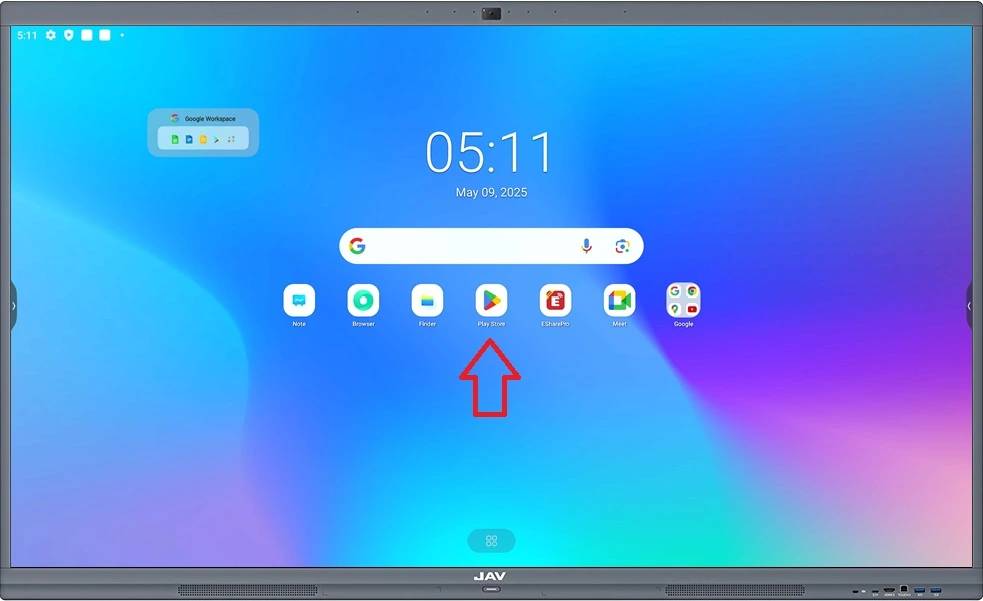
- Open the Google Play Store
From the Home screen, tap the Google Play Store icon to launch the app.
2. Search for a Media Player
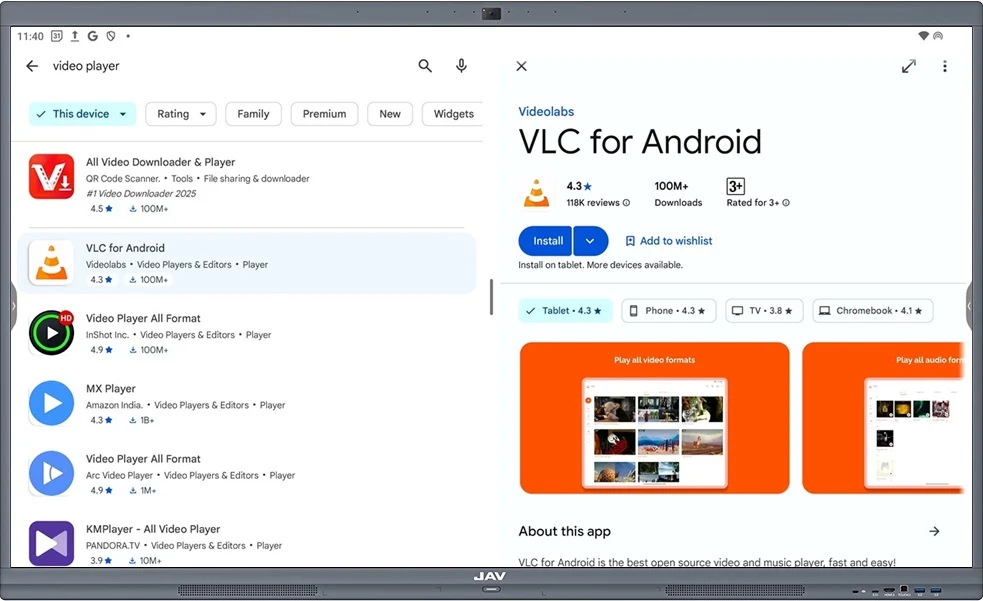
In the search bar, type “video player” or the name of a specific player, such as VLC or MXPlayer.
3. Download and Install
Tap on the desired video player app and select Install to begin the download and installation process.
4. Open Your Media File
Once the media player is installed, you can use it to play unsupported files. Open the Finder app to locate the media file you want to play.
5. Choose Your Media Player
Double-tap on the file, and a pop-up will appear asking you to select an app to open it. Choose the video player you just installed to play your file.
Now you can enjoy all your media files, no matter the format, on your JAV Smart Board!