

This guide provides a complete overview of all ports and interface locations on the JAV Board 10 スマートボード. Use this reference to understand each connection point and how it supports your classroom or meeting room setup.
1. Front Interface
The front interface includes the most frequently used ports and components for quick access during teaching, presenting, or collaboration.
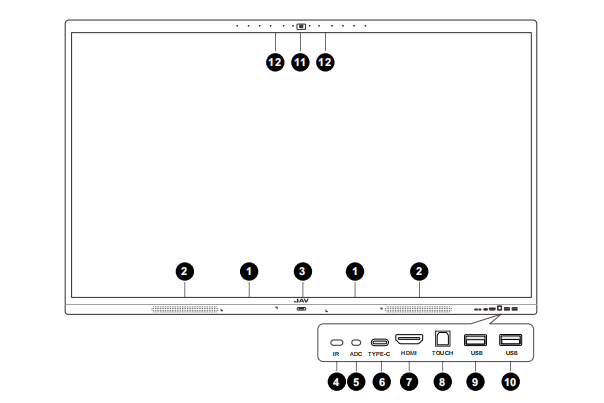
Front Components & Ports
| Number | Port / Component | 説明 |
|---|---|---|
| 1 | Stylus Slot | Holds the stylus for easy access. |
| 2 | Bottom Loudspeaker | Built-in speakers for clear audio playback. |
| 3 | Power Button | Turns the display on/off. |
| 4 | Remote Control Receiver | Receives infrared signals from the remote control. |
| 5 | Light Sensor | Automatically adjusts screen brightness based on ambient lighting. |
| 6 | Type-C | Connects laptops/mobile devices for display, charging, and data. |
| 7 | HDMI | Connects external video sources (PC, laptop, media player). |
| 8 | TOUCH (USB-B) | Provides touch feedback to an external computer. Must be used with HDMI or Type-C. |
| 9 | USB 3.0 | High-speed USB input for flash drives, peripherals, or accessories. |
| 10 | USB 3.0 | Additional high-speed USB port for external devices. |
| 11 | Camera | Built-in camera for video conferencing. |
| 12 | Microphone | Built-in microphone array for voice pickup and meetings. |
2. Rear Interface
The rear interface provides extended connectivity options, especially for devices that remain connected for longer-term use.
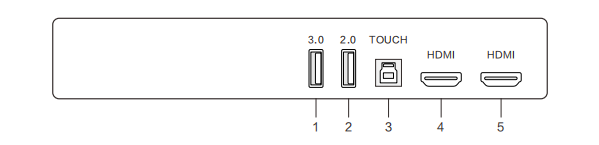
Rear Ports & Functions
| Number | Port | Function Description |
|---|---|---|
| 1 | USB 3.0 | Connects mobile hard drives, flash storage, USB keyboard/mouse, and high-speed devices. |
| 2 | USB 2.0 | Connects USB peripherals such as keyboards, mice, or USB storage. |
| 3 | TOUCH (USB-B) | Sends touch signals to an external computer (use together with HDMI). |
| 4 / 5 | HDMI | Inputs for uncompressed digital video and audio from external devices. |
3. Bottom Interface
The bottom interface contains ports for audio, network, control, and power connections.
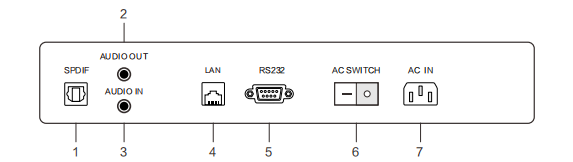
Bottom Ports & Functions
| Number | Port | Function Description |
|---|---|---|
| 1 | SPDIF | Sony/Philips Digital Interface for digital audio output. |
| 2 | AUDIO OUT | Outputs audio to speakers, amplifiers, or external sound systems. |
| 3 | AUDIO IN | Receives audio from external devices. |
| 4 | LAN | Connects the smart board to a wired network for stable internet access. |
| 5 | RS232 | Serial port used for device control and data communication with automation systems. |
| 6 | AC SWITCH | Power switch (on/off). |
| 7 | AC IN | Main power input. Connects to the power source. |
Understanding How the Ports Work Together
- To use the board as a touch display for a laptop, connect HDMI + TOUCH (USB-B), or use a single Type-C cable if your laptop supports DP Alt Mode.
- Front USB ports (USB 3.0) are ideal for quick plug-and-play access.
- Rear USB and HDMI ports are better for permanently connected devices.
- SPDIF and AUDIO OUT allow integration with external audio systems for larger rooms.
- RS232 enables compatibility with professional control systems.
Need More Help?
If you have questions about connecting your devices or setting up your workspace, feel free to contact our support team—we’re here to help you get the most out of your JAV Board 10.